How to Track AI Overviews and AI Search Traffic
AI answers now sit on top of almost every marketing query we target, and no single tool shows the whole path from that answer to a sale. Here is the stack we use to see as much of it as can be seen, and the numbers it gave us.

You track AI Overviews with five signals; no single tool covers the path from AI answer to click. The five: Search Console's Generative AI performance report for link impressions, a SERP API that records whether an AI Overview appears and whom it cites, GA4 for clicks from AI assistants, a fixed set of buyer prompts run on a schedule, and server logs for AI crawlers.
We built this stack into Wire, our own SEO tool, and run it on our own sites; the examples below come from that setup.
Key takeaways
- Search Console counts AI Overview and AI Mode traffic inside the Web search type. Since June 2026 a separate Generative AI report shows link impressions in those features, without clicks or queries.
- GA4 files clicks from AI Overviews and AI Mode as Google organic. Clicks from ChatGPT, Gemini, Copilot and similar assistants go to the AI Assistant channel or to a custom channel you define with a regex.
- To see whom an AI Overview cites, you need a SERP API or rank tracker that captures its references. On 2026-10-07, 17 of 18 marketing queries we checked had one.
- For ChatGPT-style answers, run a fixed list of buyer prompts on a schedule, through the assistant's search mode, and log mentions and citations separately.
- Someone who reads an answer built from your page and never visits is invisible to every tool.
Can AI searches be tracked?
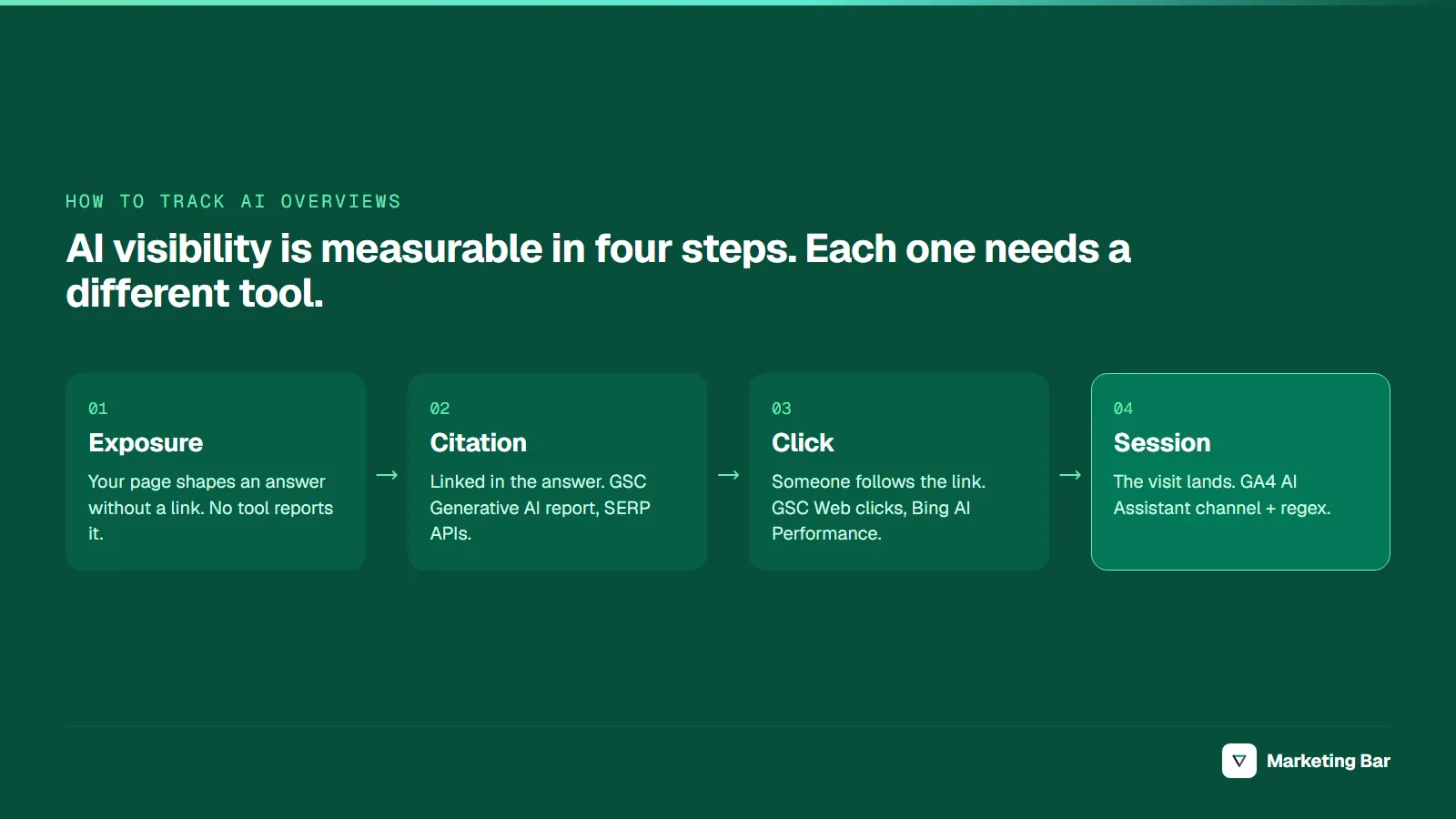
Partly. An AI answer goes through four steps, and each step is visible to different tools:

The further down the path, the more you can measure, and the fewer people are left. Source: Marketing Bar.
Exposure without a link, where your page shapes an answer but is not shown as a source, is reported by no tool. Measurement begins at the citation: Google's Generative AI report counts link impressions, and SERP APIs, Bing's AI Performance report and prompt tracking detect links. Analytics starts only at the click.
New to the vocabulary? Our SEO vs GEO vs AEO glossary defines the terms.
The AI visibility tracking stack
| Signal | Tool | What it tells you | Blind spot |
|---|---|---|---|
| AI feature link impressions | GSC Generative AI report | How often links to your URLs were shown in AI Overviews and AI Mode, by page, country, device, date | No clicks, no queries, AIO and AI Mode combined |
| All Google search traffic | GSC Performance, Web | Clicks, impressions and queries, AIO and AI Mode included | AI features cannot be filtered out |
| Copilot and Bing citations | Bing Webmaster Tools AI Performance | Citation counts per page, grounding queries | Microsoft surfaces only, no clicks |
| AIO presence and citations | SERP API or rank tracker | Which of your queries trigger an AIO and which domains it cites | Only the queries you pay to check |
| Assistant mentions | Scheduled prompt tracking | Whether ChatGPT, Gemini or Perplexity names you for buyer prompts | Your prompts, not real users' |
| Assistant clicks | GA4 channel group | Sessions and conversions from chatgpt.com, perplexity.ai and others | App traffic without a referrer lands in Direct |
| AI crawler visits | Server logs | Which AI bots fetch which pages | A fetch is not a citation |
Bing's report has been in public preview since February 2026 and covers Copilot, Bing's AI summaries and some partner integrations.
What does Google Search Console show for AI Overviews?
The Performance report, Web search type, includes AI features. Sites appearing in AI Overviews and AI Mode "are included in the overall search traffic in Search Console," reported "within the Web search type" (Google Search Central, 2025). The counting rules (Search Console Help):
- A click on an external link inside an AI Overview or AI Mode counts as a click.
- Standard impression rules apply.
- An AI Overview occupies a single position, and every link inside it gets that position.
- A follow-up question in AI Mode counts as a new query.
The Generative AI performance report shows AI link impressions on their own. Google announced it in June 2026 for a subset of sites and rolled it out to all sites by August 31, 2026. Per the help page, it counts "how many times links to your site were shown" in AI Overviews and AI Mode, combined, by page, country, device and date, with a search-type filter for text versus multimodal (image) searches. No clicks, no queries, and the report may not appear for a site with too few AI impressions.
Estimate the AI Overview effect on clicks
AIO clicks can't be isolated, so estimate the effect by joining two sources:
- Flag every GSC query that shows an AI Overview, using a SERP API run over your query list.
- Compare CTR for AIO and non-AIO queries at similar average positions (buckets 1–3, 4–6, 7–10).
- For one important query, compare CTR in the weeks before and after an AI Overview first appears on it.
| Position bucket | CTR, queries without AIO | CTR, queries with AIO |
|---|---|---|
| 1–3 | 12% | 7% |
| 4–6 | 4% | 3% |
Illustrative numbers. The gap within a bucket is your estimate of what the AI Overview costs or adds. It is a correlation: AIO queries also differ in intent.
Prompt-shaped queries are already in your Search Console data
In marketing-bar.com's GSC data for the last 120 days, 206 queries had one to five words, 20 had six to nine, and 1 had ten or more:
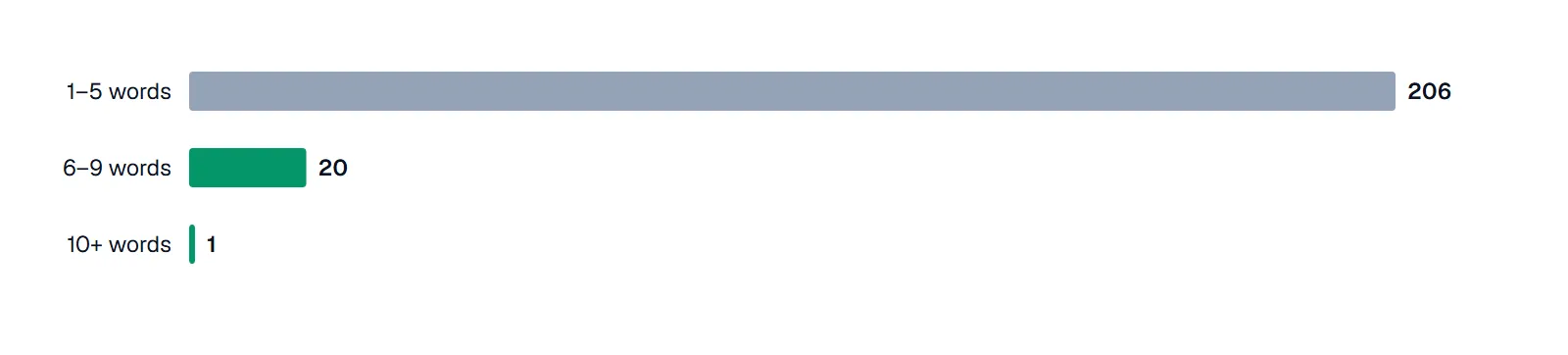
Long, prompt-shaped queries are still rare. Source: Wire, Google Search Console, marketing-bar.com, last 120 days to 2026-10-07.
That query reads like a prompt typed into an assistant: "which performance marketing agencies have the deepest expertise specifically in fashion and apparel d2c, as opposed to being generalist agencies?" It earned 13 impressions and no clicks. The one 10+-word query first showed up in July 2026, the same month our total impressions jumped from ~100 to ~690 a month, so treat it as a hint, not a trend. Filtering GSC queries by word count (a regex such as ^(\S+\s+){5,}\S+$ for six words or more) is a free way to watch this.
How to track traffic from AI Overviews in GA4
You can't separate it. A click from an AI Overview or AI Mode arrives with a google.com referrer and lands in Organic Search, identical to a blue-link click. Google's default channel group definitions exclude AI Overviews and AI Mode from the AI Assistant channel.
What GA4 can track is traffic from standalone assistants.
The built-in AI Assistant channel, rolled out in May–June 2026, sets the medium to ai-assistant when the referrer matches Google's list of AI assistants. Google names ChatGPT, Gemini, Deepseek, Copilot and Grok as examples; the full list is not published.
A custom channel for control. Build your own to catch sources Google's list may miss:
- Admin → Data display → Channel groups → create a new group (copy the default).
- Add a channel named "AI assistants" with the condition Session source matches regex:
.*(chatgpt|chat\.openai|perplexity|gemini\.google|copilot|edgeservices\.bing|claude\.ai|deepseek|grok|meta\.ai).*
- Drag it above Referral and Organic Search. GA4 assigns a session to the first channel that matches.
- Save, then switch your Traffic acquisition report to the new group.
GA4's "matches regex" must match the whole value, so the pattern is wrapped in .*. Matching on source rather than referrer also catches visits that carry only a UTM tag: "ChatGPT automatically includes the UTM parameter utm_source=chatgpt.com in referral URLs" (OpenAI, Publishers and developers FAQ). If ChatGPT sessions show up as chatgpt.com / (not set) in Unassigned, the source-based custom channel is what catches them. Gemini has started tagging outgoing links too, undocumented (Search Engine Journal, 2026), so check your source list for new Gemini values. Copilot answers inside Bing arrive as bing / organic and stay there.
Expect undercounting. Visits from mobile apps and in-app browsers can arrive without a referrer and land in Direct. Our GA4 audit checklist covers the channel and referral-exclusion settings that break this report.
How to check whether a query shows an AI Overview
To track AI Overviews across a keyword list, you need a tool that fetches the SERP from a fixed location and device and stores what it finds. Three categories do this:
| Tool category | Examples | What you get |
|---|---|---|
| Rank trackers with AIO tracking | Semrush, Ahrefs, SE Ranking | AIO present yes/no and whether your domain is cited, per tracked keyword |
| SERP APIs | DataForSEO, SerpApi | Raw SERP data: the AIO text, every referenced URL, the organic results |
| AI visibility platforms | Otterly.AI, ZipTie, Profound | Mentions and citations across Google, ChatGPT, Perplexity and others |
We use DataForSEO's SERP API inside Wire; it also has a separate Google AI Mode endpoint. AI Overviews often load asynchronously, so a scraper that reads only the initial HTML misses them; DataForSEO's load_async_ai_overview option fetches those.
On 2026-10-07 we checked 18 marketing queries from our topic research (US, desktop). 17 showed an AI Overview; the exception was "marketing dashboard example." A wider 38-query pull the same day found that only 31% of the domains AI Overviews cited also ranked among the organic results; what AI Overviews are breaks that study down.
How to track mentions in ChatGPT, Perplexity and Gemini
Assistants give site owners no report, so you measure from outside: ask what buyers ask and record the answers.
Write a fixed prompt set
Start with 30–50 buyer prompts, phrased the way people type into assistants; we run 75. Keep the list fixed.
Pin the model and settings
Record the model and version for every run, so a model change is not mistaken for progress.
Run on a schedule
Monthly is enough for most sites. Answers vary between runs, so trust trends across several runs.
Log mention and citation separately
A mention is your brand named; a citation is a link to your domain. Log competitors named too.
Which AI crawlers to look for in server logs
Logs show which AI systems fetch your pages, not what gets cited. Search access logs for these tokens:
| User agent | Operator | Purpose |
|---|---|---|
| GPTBot | OpenAI | Crawling to improve foundation models |
| OAI-SearchBot | OpenAI | Surfacing sites in ChatGPT search |
| ChatGPT-User | OpenAI | Fetches triggered by a user's request in ChatGPT |
| PerplexityBot | Perplexity | Indexing for Perplexity search results |
| Perplexity-User | Perplexity | Fetches when a user asks a question |
| ClaudeBot / Claude-SearchBot / Claude-User | Anthropic | Training, search quality, user-initiated fetches |
Sources: OpenAI, 2026, Perplexity, Anthropic.
User-initiated agents (ChatGPT-User, Perplexity-User, Claude-User) are the closest thing to a live signal: a person asked something and the assistant fetched your page. OpenAI and Perplexity both note that robots.txt rules may not apply to these fetches.
AI Overviews have no separate crawler: Googlebot fetches the pages, so logs can't show AIO share; the same goes for Copilot and Bingbot. Google-Extended won't appear either: it "doesn't have a separate HTTP request user agent string," is a robots.txt token for Gemini training and grounding, and "does not impact a site's inclusion in Google Search" (Google Search Central).
What you can't measure
- Exposure without a link. Someone reads an AI answer built partly from your page, with no link to you, and never visits.
- AI Overview clicks as a separate number. They sit inside Organic Search in GA4 and inside Web in Search Console.
- Real assistant queries. Prompt tracking tests your guesses. Bing's grounding queries and long GSC queries are the only glimpses of the real thing.
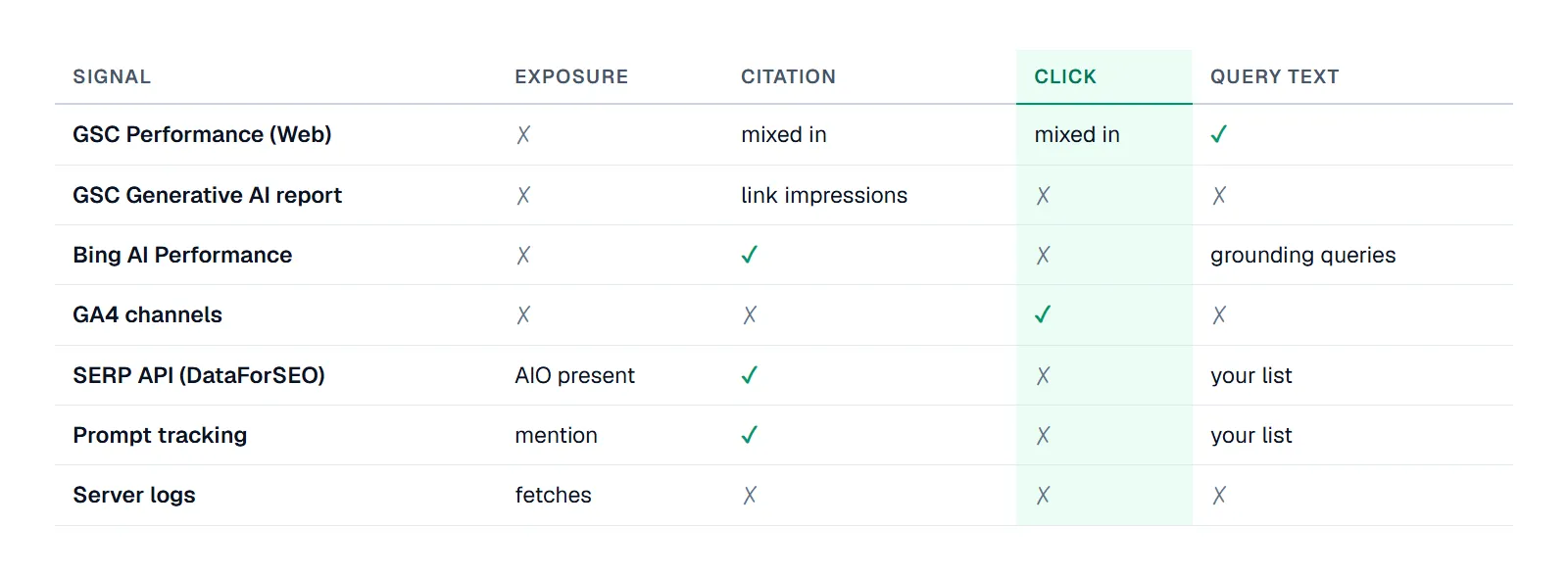
Only GA4 measures assistant clicks cleanly, and only Search Console gives real user queries. Source: Marketing Bar.
Improving these signals is the subject of our guides to GEO for DTC operators and LLM SEO.
How we got these numbers
All first-party figures come from Wire, run on our own sites. Query-length buckets are marketing-bar.com GSC queries over the last 120 days to 2026-10-07, counted in words; monthly impression totals come from GSC daily totals. The prompt-run example used 75 fixed buyer prompts on gpt-4.1-mini-2025-04-14 via the API without web search (June 2026). The SERP checks used DataForSEO's Google organic SERP API, US, desktop, English, 2026-10-07. The 18-query check used the standard SERP call; the 38-query study added load_async_ai_overview: true and counted cited domains found among the organic results in the first 10 SERP items (5–9 organic links per query).
If you want this stack set up and read for your brand, that is part of our SEO, GEO and AEO service.
FAQ
Partly. Search Console counts link impressions in AI Overviews and AI Mode, GA4 counts clicks from assistants like ChatGPT and Perplexity, and SERP APIs record AI Overview citations.
For a few queries, search manually from a fixed location (or a VPN set to your market) in a clean browser, and log the date and device each time. For a keyword list, use a rank tracker with AI Overview tracking or a SERP API.
In two places: inside the Performance report under the Web search type, mixed with regular results, and in the Generative AI performance report, which shows link impressions without clicks or queries.
No. The Generative AI performance report combines AI Overview and AI Mode impressions, and the Performance report mixes both into the Web search type.
Check the AI Assistant channel in the default channel group, or create a custom channel with "session source matches regex" for chatgpt, perplexity, gemini.google, copilot, claude.ai and similar sources, placed above Referral.