GA4 Ecommerce Events: Full List, Parameters and Fixes
Thirteen of GA4's ecommerce events describe the path to a sale. The fourteenth, purchase, is the one your revenue reports, ROAS and ad bidding read, and the one where a duplicate, an empty ID or a missing currency does the most damage.

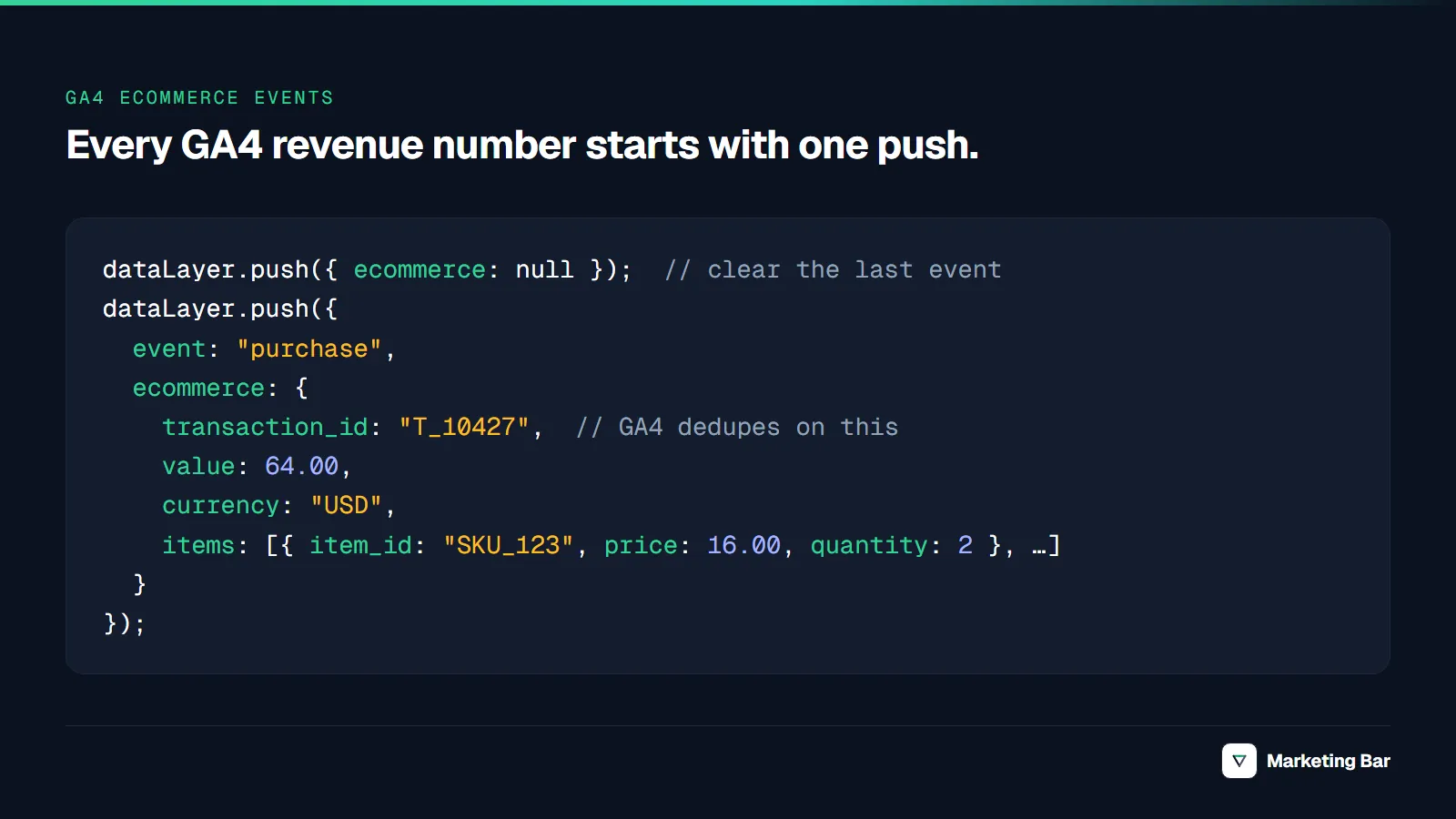
GA4 ecommerce events are 14 recommended events that track a shopper from product list to refund: view_item_list, select_item, view_item, add_to_wishlist, add_to_cart, remove_from_cart, view_cart, begin_checkout, add_shipping_info, add_payment_info, purchase, refund, plus view_promotion and select_promotion. Twelve of them require an items array; for select_promotion and refund it is optional. Only purchase adds revenue (refund subtracts it), and it needs four fields to do that correctly: transaction_id, value, currency and items.
Names and parameters are checked against Google's GA4 ecommerce measurement guide and the recommended events reference (Google for Developers, 2026).
Key takeaways
- GA4 has 14 recommended ecommerce events. Twelve require an
itemsarray; each item needsitem_idoritem_name. purchaserequirestransaction_id,items, andvaluewithcurrency. Google says to setvalueto the sum of price × quantity and leave out shipping and tax.- GA4 deduplicates purchases with the same
transaction_id, but only for web streams, and an empty string ID makes GA4 collapse every purchase that carries it. - Most duplicate purchases follow one pattern in GA4 and ad platforms alike: the same order reaches a report through two signals. In one Meta account we checked, summing one purchase across five event names inflated ROAS from 2.53× to 12.63×.
- Validate in DebugView first, then run a BigQuery query for repeated
transaction_idvalues.
What are GA4 ecommerce events?
They are a subset of GA4's recommended events: names and parameters Google predefines so the Monetization reports can read them. GA4 does not collect them automatically; you send them through gtag.js, Google Tag Manager, or a platform integration. Use the exact names: order_complete or checkout_success arrive as custom events and the ecommerce reports ignore them.
The full list of GA4 ecommerce events, in funnel order
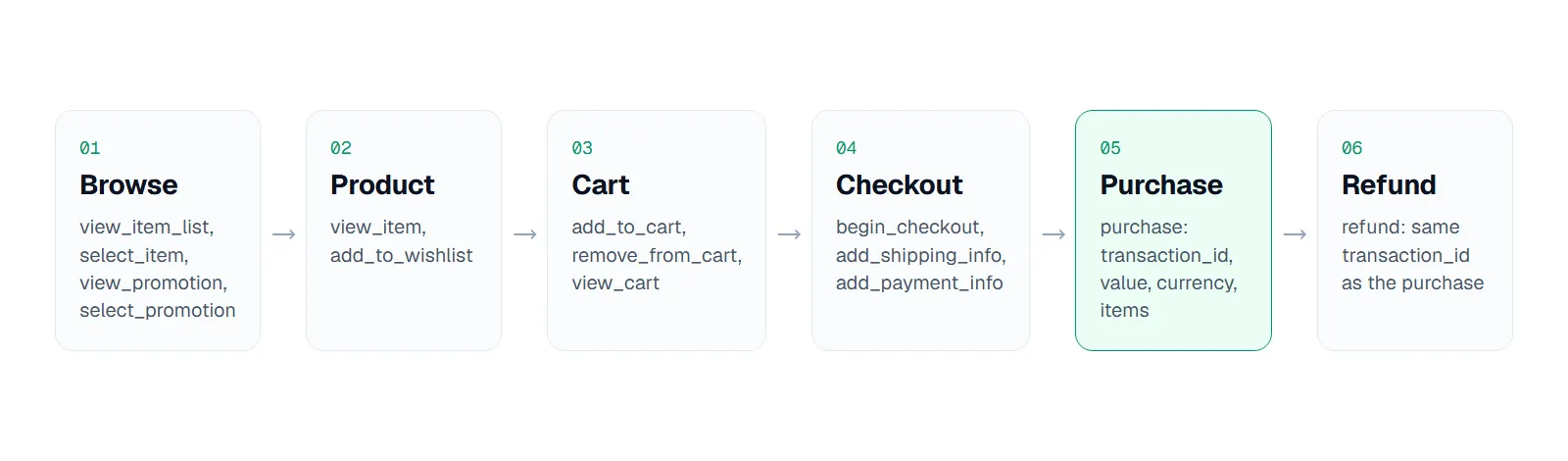
14 events, six stages; purchase is the only one that adds revenue. Source: Google for Developers, GA4 ecommerce guide, 2026.
| Stage | Event | Required event-level params |
|---|---|---|
| Browse | view_item_list | items |
| Browse | select_item | items |
| Browse | view_promotion | items |
| Browse | select_promotion | none (items optional) |
| Product | view_item | items; value + currency |
| Product | add_to_wishlist | items; value + currency |
| Cart | add_to_cart | items; value + currency |
| Cart | remove_from_cart | items; value + currency |
| Cart | view_cart | items; value + currency |
| Checkout | begin_checkout | items; value + currency |
| Checkout | add_shipping_info | items; value + currency |
| Checkout | add_payment_info | items; value + currency |
| Purchase | purchase | transaction_id, items; value + currency |
| Refund | refund | transaction_id; value + currency |
Google marks value and currency as "Yes*": value "is typically required for meaningful reporting," and "if you set value then currency is required for revenue metrics to be computed accurately." Treat the pair as required on every event that has a price.
Required parameters for the key events
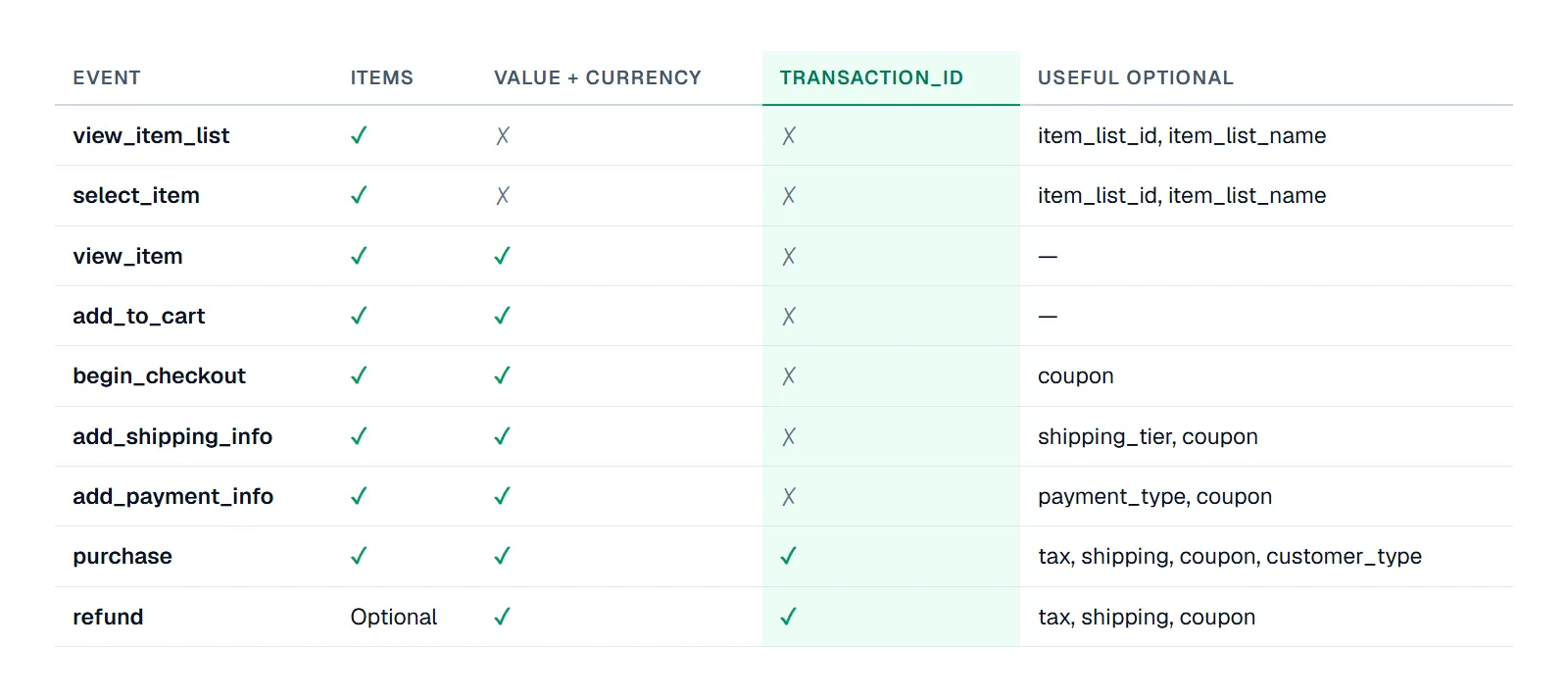
Of these nine events, only purchase and refund need transaction_id, and refund is the only one where items are optional. Source: Google for Developers, recommended events reference, 2026.
Useful optional parameters: coupon from begin_checkout on, shipping_tier and payment_type on the two checkout steps, and tax, shipping and customer_type (new or returning) on purchase. items is optional on refund, but Google recommends including it "to see item-level refund metrics in Analytics"; the refund itself is tied to the order by transaction_id.
Where these events show up in GA4
| Report | Built from |
|---|---|
| Monetization overview | Purchase revenue and purchases across all ecommerce events |
| Ecommerce purchases | Item-level views, add-to-carts and purchases, from items |
| Purchase journey | view_item → add_to_cart → begin_checkout → purchase |
| Checkout journey | begin_checkout → add_shipping_info → add_payment_info → purchase |
| Promotions | view_promotion, select_promotion |
| Order coupons | coupon on purchase |
The report list comes from Google Analytics Help. purchase is also a key event by default for web and app (Google Analytics Help). A missing checkout step leaves a hole in the Checkout journey even when revenue looks right.
The GA4 items array
items is an array of product objects. The rules from Google's reference:
- One of
item_idoritem_nameis required in each item. Send both: the ID joins to your catalog and ad feeds, the name makes reports readable. priceis the unit price after discount. "If a discount applies to the item, setpriceto the discounted unit price and specify the unit price discount in thediscountparameter."quantityis the number of units. Event-levelvalueshould equal the sum ofprice × quantity.- Optional:
item_brand,item_categorytoitem_category5,item_variant,item_list_name,index,coupon,discountand others. - Limits: up to 200 items per event and up to 27 custom item parameters.
Keep item_id identical to the ID in your product feed. If GA4 says SKU-123 and your Google Shopping feed says shopify_US_123_456, item reports and feed data never join.
A correct GA4 purchase event (dataLayer example)
For Google Tag Manager, push the purchase on the order confirmation page, once per order. This follows Google's GTM example, with the items filled in:
dataLayer.push({ ecommerce: null });  // clear the previous ecommerce object
dataLayer.push({
  event: "purchase",
  ecommerce: {
    transaction_id: "100482",      // your order number; unique, never empty
    value: 64.00,                  // sum of price x quantity; no tax, no shipping
    tax: 5.12,
    shipping: 5.99,
    currency: "USD",               // ISO 4217, required when value is set
    coupon: "FALL10",
    customer_type: "new",
    items: [
      {
        item_id: "SKU-1042",
        item_name: "Merino Crew Sock",
        item_brand: "Example Brand",
        item_category: "Socks",
        item_variant: "Charcoal / M",
        price: 16.00,              // unit price after discount
        discount: 2.00,            // unit discount
        quantity: 2
      },
      {
        item_id: "SKU-2210",
        item_name: "Wool Beanie",
        item_category: "Hats",
        price: 32.00,
        quantity: 1
      }
    ]
  }
});
Illustrative numbers. 2 × $16 + 1 × $32 = $64, so value is 64.00, with tax and shipping in their own fields. In GTM, the GA4 Event tag uses {{Event}} as its name with Send Ecommerce data checked and Data Layer as the source.
Common mistakes that break GA4 ecommerce reports
Start from what looks wrong in GA4 and work back:
| Symptom in GA4 | Cause | Fix |
|---|---|---|
| Purchases higher than orders in Shopify or your backend | Two sources send purchase and they disagree on the ID (checkout token vs order number, order name #1042 vs numeric ID) or one sends none; or purchase comes through a stream GA4 does not deduplicate | One purchase source per property; real order number as transaction_id |
| Purchases far lower than orders, many collapsed into one | transaction_id sent as "" or as a hard-coded value | Pass the dynamic order ID; never an empty string |
| Purchases counted, revenue 0 or wrong | value sent without currency, or value as a string with a currency symbol | Numeric value, ISO currency on every event with a value |
| "(not set)" item names | Items lack item_name / item_id | Send both in every item |
| No item rows at all | Items sent under another key (products) | Put products in items |
| Purchases dated days after the order | Purchase fires on every load of the thank-you page (reloads, bookmarks, order-status links) and the ID is missing or regenerated, so GA4 cannot deduplicate | Fire once per order: flag the order ID in storage, or render the push only on first view |
| Revenue off from the backend by a varying margin | Tax and shipping inside value on some paths, excluded on others | value = price × quantity; tax and shipping in their own fields on every path |
| Ecommerce events carry the previous push's items, or arrive under UA names | No ecommerce: null clear between pushes on the same page; legacy UA event names (addToCart) passed through {{Event}} become custom events, and UA fields translate only partially | Clear before each push; rebuild the dataLayer to GA4 event names and the GA4 items schema |
| Revenue gap grows after a cookie banner launch | Purchase push fires before the consent platform restores saved consent, so the tag is blocked on that trigger; or basic mode drops all pre-consent hits | Set default consent before any tag; fire purchase on a trigger that runs after consent is restored; choose basic vs advanced mode deliberately |
On value, Google is explicit: "Don't include shipping or tax"; the damage comes from mixing conventions, such as subtotal from the storefront and total from a subscription app. A thank-you reload is harmless only while the ID is stable, and ad-platform tags on the same trigger may count it anyway, so fire once per order.
Missing or duplicate transaction_id
Google's ecommerce help states that GA4 "will deduplicate purchases if 2 purchases are registered with the same transaction ID," that this "only works for data collected through web streams, not app streams," and that you should not send an empty string because GA4 "will deduplicate all purchase events that have transaction_id=""" (Google Analytics Help, 2026). Google does not document a time window for transaction_id deduplication, and it applies only to web streams; treat it as a backstop, not a fix.
Consent mode gaps
Under basic consent mode, tags are "blocked until user interaction with a consent banner" and "no data is sent before a user consents." Under advanced mode, tags load with consent denied and send cookieless measurements for modeling (Google for Developers, consent mode, 2026). If the purchase push fires before your consent platform restores a returning customer's saved choice, a tag that requires analytics_storage is blocked on that trigger and GTM does not re-fire it later; the purchase is simply missing. Setting the default after tags fire causes the opposite problem: tags run with no consent state at all. Check the confirmation page specifically; it is often a different template from the rest of the site.
The duplicate-purchase lesson from ad platforms
In one anonymized DTC brand's Meta Ads account connected to Level, our reporting tool, Meta returned each website purchase under five event names with identical values, and summing them gave a ROAS of 12.63× against a real 2.53×. In the same brand's Google Ads account, an old and a new purchase action overlapped for about two weeks during a migration and counted those orders twice. The GA4 version is the same mistake, and the rule carries over: one order, one purchase signal per destination, keyed by the order number (full breakdown in our ROAS formula article; for Meta pixel and CAPI deduplication, see our Meta CAPI for Shopify guide).
How to validate GA4 ecommerce events
- Tag Assistant. Walk the funnel in Tag Assistant; confirm each event's name,
items, and a numericvaluewithcurrency. - DebugView. In GA4 Admin → DebugView, open
purchaseand checktransaction_idandvalue. - Reload test. Refresh the confirmation page twice. DebugView should not show three purchases from your tags.
- Reconcile. Compare a week of GA4 purchases and revenue with backend orders. Our GA4 audit checklist puts this reconciliation first.
- BigQuery. With the export linked, query raw events for repeated or empty transaction IDs.
BigQuery query for duplicate transaction_ids
Replace the project and dataset with your own (analytics_ followed by your property ID):
-- Purchase events per transaction_id, last 30 days
SELECT
  ecommerce.transaction_id                   AS transaction_id,
  COUNT(*)                                   AS purchase_events,
  COUNT(DISTINCT user_pseudo_id)             AS users,
  SUM(ecommerce.purchase_revenue)            AS revenue_summed,
  MIN(TIMESTAMP_MICROS(event_timestamp))     AS first_seen,
  MAX(TIMESTAMP_MICROS(event_timestamp))     AS last_seen
FROM `your-project.analytics_123456789.events_*`
WHERE _TABLE_SUFFIX BETWEEN
        FORMAT_DATE('%Y%m%d', DATE_SUB(CURRENT_DATE(), INTERVAL 30 DAY))
    AND FORMAT_DATE('%Y%m%d', CURRENT_DATE())
  AND event_name = 'purchase'
GROUP BY transaction_id
HAVING COUNT(*) > 1
    OR transaction_id IS NULL
    OR transaction_id IN ('', '(not set)')
ORDER BY purchase_events DESC;
Today's data sits in events_intraday_* and is excluded; dates are in UTC suffix order, not your property timezone. The export holds events as collected, and Google does not document applying transaction_id deduplication to it, which is why duplicates can show up here even when GA4 reports look right.
Two events minutes apart point to reloads or two tags; dozens across many users point to a hard-coded or empty ID. A NULL or (not set) row with a large count means purchases GA4 cannot deduplicate at all.
GA4 ecommerce tracking on Shopify
Shopify connects GA4 through its Google & YouTube app, which tracks "certain ecommerce events" automatically (Shopify Help Center). According to PPC Land (2026), Google began sending Shopify purchases to GA4 server-to-server in July 2026, deduplicated by transaction ID, and the same report quotes Littledata's founder: only the purchase is server-side, the other events remain browser-based. Per that report, the app now sends page_view, view_item, add_to_cart, begin_checkout, purchase, and since August 17, 2026 also view_item_list, remove_from_cart, view_cart and add_shipping_info; add_payment_info and refund are not in that list.
What that means in practice:
- Pick one purchase source. If the app sends purchases, do not also send them from GTM or a custom pixel to the same property.
- Storefront and checkout need different routes. Storefront events the app does not send (
select_item, the promotion events,add_to_wishlist) can come from theme code or GTM in the theme. Checkout events such asadd_payment_infocan only come through Shopify's Customer Events: an app pixel or a custom pixel subscribed topayment_info_submitted. Since Shopify's checkout extensibility upgrade, checkout, thank-you and order status pages run no theme code and no Additional Scripts: Additional Scripts became view-only on August 28, 2025, and August 26, 2026 was the deadline for non-Plus stores to upgrade those pages (Shopify Help Center). Custom pixels run in a sandboxed iframe, so GTM's preview mode does not work inside them andpage_locationmust be set explicitly. refunddoes not come from the browser. Send it server-side (Measurement Protocol or a connector) with the originaltransaction_id.- Check what actually arrives. Shopify's Google app changed how purchase is sent (July 2026) and which events it sends (August 2026). Run DebugView on your own store before assuming any event is or is not sent.
You cannot see where checkout loses people if add_shipping_info never fires; our Shopify conversion rate optimization guide uses these steps as its funnel.
How we got these numbers
Event names, parameters, limits and report names come from Google's documentation, read on 2026-10-07; quotes are verbatim. Shopify behavior comes from Shopify's help center and PPC Land (August 2026), not confirmed on a live store. The ad-platform figures come from one anonymized DTC brand's accounts in Level, Q3 2026, as each API reported them; one account is an example, not a benchmark.
If you want this set up and reconciled against your backend, that is our GA4 and tracking setup service.
FAQ
Fourteen recommended ecommerce events, from view_item_list to refund, including two promotion events.
transaction_id and items are required. value and currency are required for revenue to compute: if you send value, send currency. tax, shipping, coupon and customer_type are optional.
No, per Google's reference: set value to the sum of price × quantity for the items and send tax and shipping in their own parameters.
Only when the duplicates share the same transaction_id and come from a web stream. Different IDs, missing IDs and app-stream purchases are not deduplicated, and an empty-string ID makes GA4 collapse all purchases that carry it.
Recommended events use names and parameters Google predefines, so GA4's reports and integrations understand them. Custom events are names you invent; they are collected but do not populate the ecommerce reports.
Usually a second purchase source, browser events lost to consent or ad blockers, or reloads without a stable transaction_id. Reconcile a week of orders against GA4 by transaction_id; see our GA4 audit checklist for the full reconciliation.
Walk the funnel in Tag Assistant, check parameters in DebugView, and query BigQuery for repeated transaction_ids.