Google Shopping Feed: Requirements, Titles and Custom Labels
Shopping ads have no keywords and no ad copy. Everything Google shows, and every query it matches, comes from the rows in your product feed.

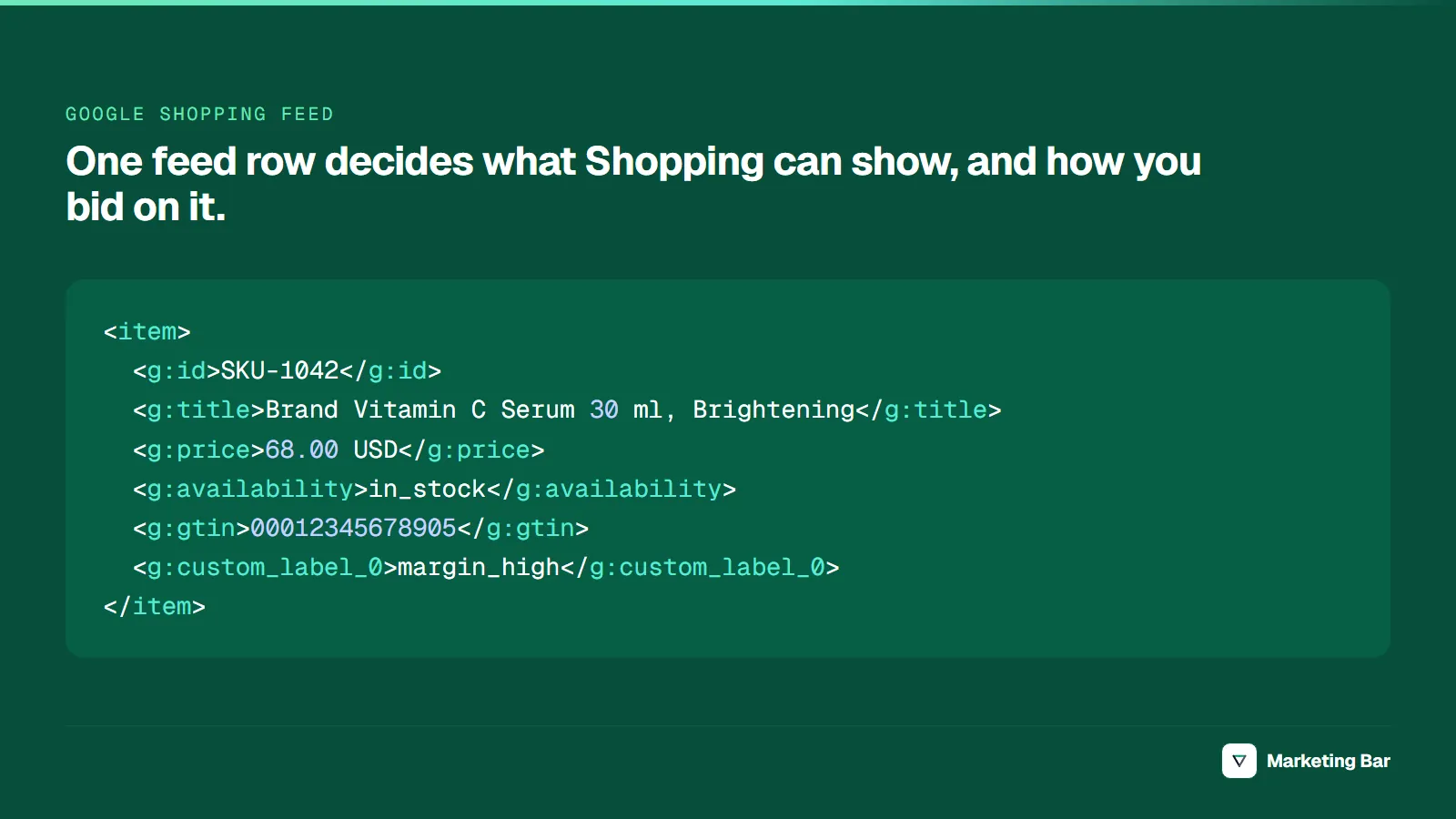
A Google Shopping feed is the product data file Merchant Center reads to build Shopping ads and free listings: one row per product, seven required attributes (id, title, description, link, image_link, availability, price). Brand is required for new products, a GTIN is strongly recommended wherever the manufacturer assigned one, and apparel adds color, size, gender and age_group.
Shopping ads have no keywords, so feed quality sets what can serve. Below is the current US specification, checked against Google's product data specification (Google Merchant Center Help, October 2026), followed by a title formula per category, a feed-audit checklist, and a custom-label scheme that maps to bid targets.
Key takeaways
- Seven attributes are required for every product in the US: id, title, description, link, image_link, availability and price. Brand is required for new products except movies, books and music.
- Apparel needs color, size (clothing and shoes), gender and age_group; variants need item_group_id.
- Since July 1, 2025 Google no longer requires US sales tax in the feed. Shipping is still required for US Shopping ads.
- Products expire 30 days after their last refresh; price and availability should update at least daily.
- Custom labels split the catalog by margin, velocity and season; each margin bucket gets its own campaign and a tROAS at or above its break-even ROAS.
What are Google Shopping ads and how do they work?
Google Shopping ads are product listings that show a photo, title, price and store name (Google Ads Help, 2026). You do not choose keywords: Google matches a shopper's search against your product data and campaign settings, and you pay per click.
They appear on the Shopping tab, next to Search results, in Google Images and on Search Partner sites; through Performance Max, also on YouTube, Display, Gmail, Maps and Demand Gen. An illustrative Google Shopping ad example: a photo of a black linen shirt, the title "Brand Men's Linen Shirt, Black, Relaxed Fit", $68, and the store's name, all pulled from the feed.

From catalog to ad: Merchant Center reads the feed for approval, the campaign reads it for matching. Source: Google Merchant Center Help and Google Ads Help, 2026.
How to set up a Google Shopping feed
- Create a Merchant Center account and add your business details.
- Verify and claim your store's website (Google Merchant Center Help).
- Set up shipping settings for the US.
- Add a product data source: the Shopify Google & YouTube app, a file, Google Sheets or the Merchant API.
- Link your Google Ads account and build a Shopping or Performance Max campaign on the approved products.
Files can be TSV, TXT or XML, uploaded, fetched on a schedule, or pulled from Google Sheets. Beyond the primary product source, Merchant Center takes supplemental sources plus separate local inventory, promotions and product reviews data.
Google Shopping feed requirements
For a US store selling new products, this is the working set:
| Attribute | Status (US) | Rule that trips people up |
|---|---|---|
id | Required | Max 50 characters, unique, never reused. Use the SKU. |
title | Required | Max 150 characters; must match the landing page; no all caps or promo text. |
description | Required | Max 5,000 characters; no promotional text or competitor names. |
link | Required | Verified domain, no interstitial pages. |
image_link | Required | No watermarks, promo text or placeholders. Spec lists a 500 × 500 px minimum, enforced from January 31, 2027. |
availability | Required | in_stock, out_of_stock, preorder or backorder; must match the page. |
price | Required | Must match landing page and checkout. In the US, exclude tax. Cannot be 0. |
brand | Required for new products | Except movies, books and music. Max 70 characters. |
gtin | Strongly recommended when a manufacturer GTIN exists | A missing GTIN limits visibility; a wrong one can disapprove the product. Must pass GS1 validation. |
mpn | Required only if there is no GTIN | Manufacturer's number only. |
identifier_exists | Optional | no for custom or private-label products with no GTIN or MPN. |
condition | Required for used and refurbished | Optional for new products. |
color, gender, age_group | Required for apparel | Shopping ads in the US, UK, Germany, France, Japan, Brazil; free listings in every country. |
size | Required for clothing and shoes | Same countries. |
item_group_id | Required for variants | Same countries; use the parent SKU. |
shipping | Required in the US | Account-level shipping settings also satisfy it. |
tax | No longer required in the US | Dropped July 1, 2025. |
Sources: the product data specification, condition, gender, Incorrect GTIN, and the 2025 specification update.
Which recommended attributes are worth filling?
product_type: your own category path (Women > Tops > Linen Shirts), up to 750 characters; a bidding dimension in Shopping and PMax.google_product_category: Google's taxonomy ID; it decides whether apparel rules apply.additional_image_link(up to 10) andsale_price(member prices can't go inpriceorsale_pricesince July 1, 2025; useloyalty_program).product_highlight(2 to 100 facts, 150 characters each) andproduct_detail(up to 100 specs).custom_label_0tocustom_label_4: covered below.
Feed sources and update frequency
- Shopify's Google & YouTube app syncs every available product and keeps it in sync (Google Merchant Center Help). Fine for required fields; titles are the Shopify product title or SEO title as written, and margin- or velocity-based custom labels usually need a supplemental source.
- File, scheduled fetch or Google Sheets: built by a feed tool or script.
- Merchant API: the programmatic route. The Content API for Shopping reached its sunset on August 18, 2026, fails intermittently from September 1, 2026 (unless Google granted an extension) and shuts down in early 2027 (Google for Developers, 2026).
- Supplemental data source: matched on
id, adds or overrides attributes, and "can't be used to add or remove products" (Google Merchant Center Help).
How often should the feed update? "All products expire from your Merchant Center account 30 days after the last refresh" (Google Merchant Center Help). Refresh price and availability at least daily, more often during sales. Automatic item updates, on by default, correct price and availability from the landing page (Google Merchant Center Help), but only after the drift happened.
Why are products disapproved in Merchant Center?
Each of these can disapprove the product. A GTIN that is missing (rather than wrong) only limits visibility (Google Merchant Center Help).
| Issue in Merchant Center | Cause | Fix |
|---|---|---|
| Mismatched product price (page crawl) | Feed price differs from the page, often after a sale starts or ends | Put the price in the initial HTML, not JavaScript; set sale_price_effective_date with the right timezone; check markup in the Rich Results Test |
| Mismatched value (page crawl) availability | Stock changed between fetches | Compare the same variant in Final Attributes and on the page; refresh daily |
| Incorrect GTIN | GTIN from another product | Use only the manufacturer's GTIN |
| Promotional overlay on image | Badge, watermark or sale text on the main image | Clean image, or turn on automatic image improvements |
| Unavailable desktop landing page | 404, too many redirects, 5xx or connection errors | Check the URL loads on desktop; test it with URL Inspection in Search Console (desktop fetch). A robots.txt block on Googlebot shows as a separate Robots.txt error |
| Missing value shipping | No shipping in feed or account settings | Set shipping in Merchant Center or the shipping attribute |
| Missing value color, gender, age_group, size | Apparel variants not mapped | Map variant options; fill gaps in a supplemental source |
| Products not refreshed in 30 days (expired) | Feed stopped updating | Schedule the fetch; check the app is connected |
Product feed optimization: a title formula per category
Google's rule: put the most important details first, because "users will usually notice only the first 70 or fewer characters of your title," and use all 150 characters for matching (Google Merchant Center Help).
| Category | Title pattern | Example |
|---|---|---|
| Apparel | Brand + gender + product type + key attribute + color + size | Brand Women's Linen Shirt, Relaxed Fit, Sage, Size M |
| Shoes | Brand + gender + model + type + color + size | Brand Men's Trail 2 Running Shoes, Black, Size 10 |
| Skincare and beauty | Brand + product type + key ingredient or concern + size | Brand Vitamin C Serum with Ferulic Acid for Dark Spots, 1 fl oz |
| Supplements | Brand + product + form + count + dietary claim on the label | Brand Magnesium Glycinate Capsules, 120 Count, Vegan |
| Home goods | Brand + product type + material + dimensions + color | Brand Weighted Blanket, Cotton, 60 x 80 in, 15 lb, Grey |
| Food and drink | Brand + product + flavor + size or pack count | Brand Ceremonial Matcha Powder, Unsweetened, 30 g Tin |
| Electronics accessories | Brand + product type + model + compatibility + color | Brand MagSafe Phone Case for iPhone 17, Clear |
Illustrative examples. The title must match the landing page, so change both. If your brand is unknown, move it after the product type. Keep supplement claims to what is on the label.
Custom labels: tie bids to margin, velocity and season
Custom labels are five private free-text fields. Google allows up to 1,000 unique values per label and one value per product, and lists season, clearance, sales performance, price range, profit margin and release year as typical uses (Google Merchant Center Help). They become product groups in Standard Shopping and listing-group filters in Performance Max, so each margin bucket can get its own campaign with its own tROAS (asset groups and product groups inside one campaign share its target).
A product's break-even ROAS is 1 ÷ its contribution margin, so one tROAS across the catalog is wrong for most of it:
| Contribution margin | Break-even ROAS | Bucket |
|---|---|---|
| 20% | 5.0× | margin_low |
| 30% | 3.33× | margin_mid |
| 40% | 2.5× | margin_mid |
| 50% | 2.0× | margin_mid |
| 60% | 1.67× | margin_high |
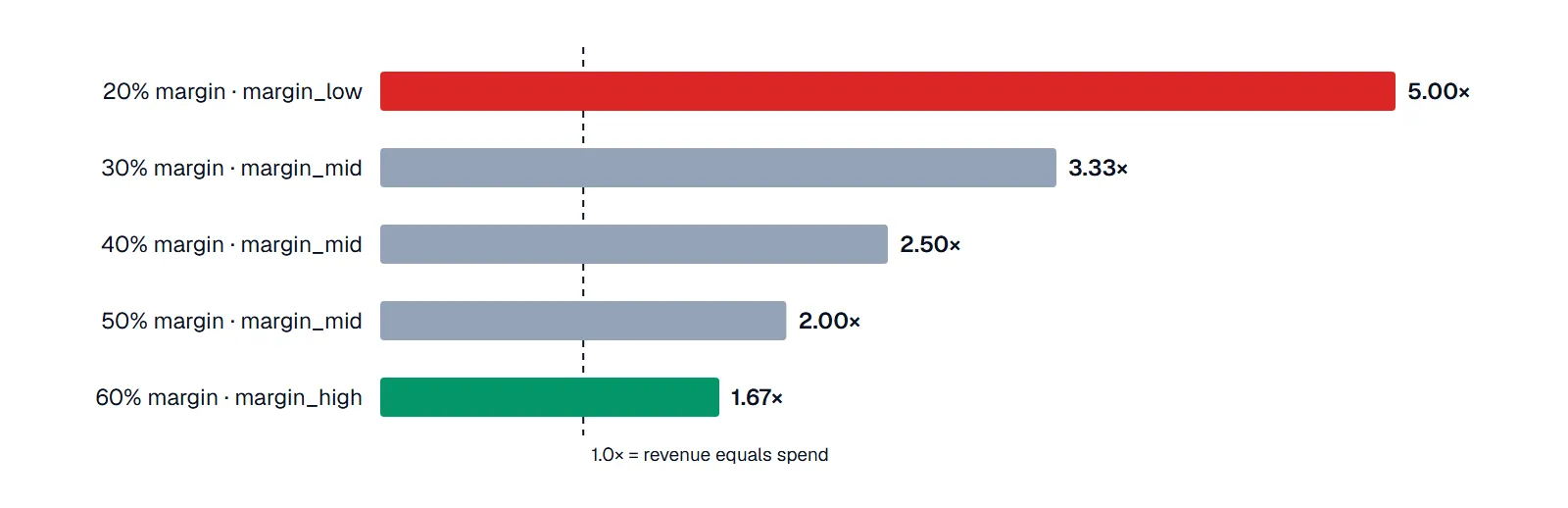
Break-even ROAS = 1 ÷ contribution margin, colored by margin bucket. Source: arithmetic; our break-even ROAS guide covers which costs belong in the margin.
| Label | Values | How to bid |
|---|---|---|
custom_label_0: margin | margin_low (<30%), margin_mid (30–50%), margin_high (>50%) | Separate campaign per bucket, tROAS at or above break-even |
custom_label_1: velocity | bestseller, core, no_sales_90d | Own budget for bestsellers; a fixed test period for no_sales_90d, then exclude |
custom_label_2: season | in_season, off_season, evergreen | Raise budget for in_season ahead of peak; restrict off_season |
custom_label_3: price band | under_25, 25_75, over_75 | Watch CPC vs AOV; consider excluding items priced below your typical cost per conversion |
custom_label_4: stock | clearance, low_stock, new_arrival | Push clearance; exclude when stock falls below N units; ring-fence new_arrival |
Thresholds are illustrative; use your own margins. Every split divides conversion data and Smart Bidding needs volume to learn: start with the margin label alone and regenerate labels from live cost data.
A Google Shopping feed audit checklist
Run it monthly and after any theme, app or pricing change.
| Check | Where to look | Pass condition |
|---|---|---|
| Disapproved and limited products | Merchant Center > Products > Needs attention | Under 2% of active SKUs, none among bestsellers |
| Price and availability drift | Mismatched value issues | Zero; feed refreshed in the last 24 hours |
| Identifiers | GTIN coverage on branded products | Every product with a manufacturer GTIN sends it |
| Titles | Top 50 products by spend | Key attribute in the first 70 characters; matches the page |
| Apparel attributes | Apparel variants | color, size, gender, age_group, item_group_id present |
| Images | Main image per product | Clean shot, no overlays |
| Custom labels | Listing groups in Google Ads | Every product in exactly one margin bucket |
| Conversion data | Google Ads conversions | One primary purchase action with values; GA4 purchase matches orders |
The 2% threshold is our working rule, not Google's.
For the conversion row, our guide to GA4 ecommerce events covers the purchase event setup. The feed is one of several checks in our Google Ads optimization checklist for DTC. Catalogs with thousands of variants or several markets usually need a Google Shopping ads agency; we run feed audits and custom-label builds within our paid advertising service.
FAQ
In the US: id, title, description, link, image_link, availability and price on every product; brand on new products; MPN only when there is no GTIN; color, size, gender and age_group on apparel; item_group_id on variants; and shipping. A GTIN is strongly recommended wherever the manufacturer assigned one; without it visibility is limited.
At least daily for price and availability, more often during sales. Products expire from Merchant Center 30 days after their last refresh.
Usually a price or availability mismatch with the landing page, promo text on the main image, a page Google can't crawl, missing shipping or missing apparel attributes. Merchant Center names the issue per product under Needs attention.
No. Since July 1, 2025 Google no longer requires US sales tax in the tax attribute or in Merchant Center settings. US prices should exclude tax.
Open a Merchant Center account, verify and claim your website, and set up shipping. Then add a product data source (the Shopify Google & YouTube app, a file, Google Sheets or the Merchant API) and link Google Ads to advertise the approved products.