Shopify 301 Redirects: Single, Bulk CSV and Migration
Shopify URL redirects live under Content > Menus > URL redirects, and they only fire when the old URL returns a 404. On 10 live storefronts we tested in November 2026, trailing-slash, uppercase and tracking-parameter variants of a product URL needed no redirect at all.

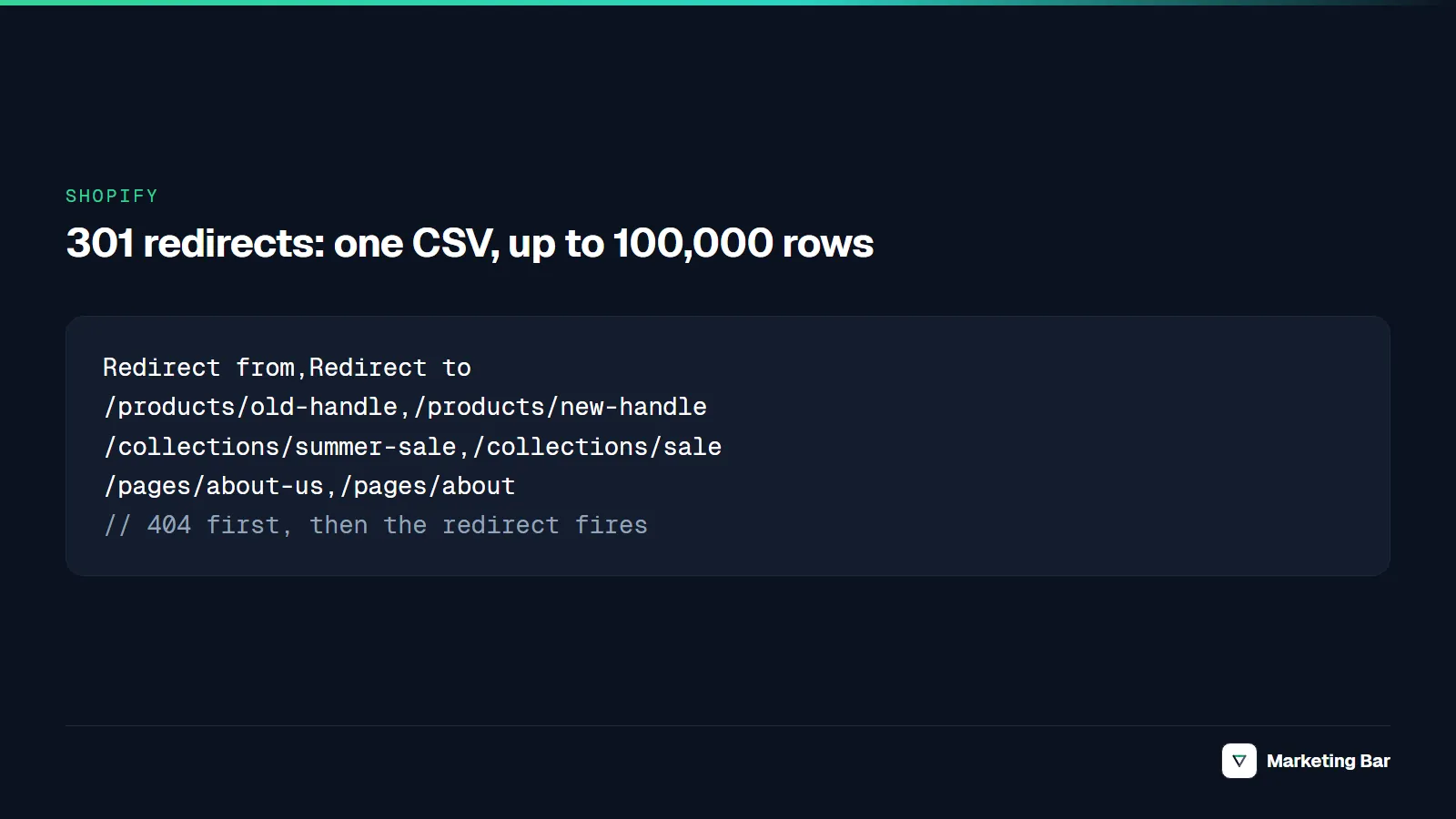
To add a Shopify 301 redirect, go to Content > Menus, click View URL Redirects, click Create URL redirect, enter the old path under Redirect from and the new path under Redirect to, and click Save redirect. It takes effect immediately (Shopify Help Center, checked November 2026). Three rules decide everything else on this page: the old URL must return a 404, the fixed system paths can't be redirected, and a standard store holds at most 100,000 redirects.
Each section below covers one job: one redirect, a CSV of thousands, a handle change, a move from another platform, and the URL variants Shopify already handles. For the wider technical picture on the platform, see our Shopify technical SEO test on six live stores.
Key takeaways
- One redirect takes four fields and a click. Bulk redirects use a CSV with two columns, Redirect from and Redirect to, uploaded with the Import button on the same page.
- A redirect fires only when the old URL is a 404. If a product, page or collection still renders at that path, Shopify serves it and ignores the redirect.
/products,/collections,/collections/all,/cart,/orders,/shopand a few other paths can't be redirected. Old WooCommerce URLs under/shop/are one casualty.- In our test of 10 storefronts, a trailing slash, an uppercase handle and a
?utm_sourceparameter all served a page whose canonical was the clean/products/<handle>URL. None of them needs a redirect. - Standard stores can hold 100,000 redirects, Plus stores 20,000,000. Keep migration redirects for at least a year.
Redirect one URL in the Shopify admin
Use this for a single deleted product, a renamed page or a retired collection.
Open the redirect list
In the admin, go to Content > Menus and click View URL Redirects. Older guides call the same screen Online Store > Navigation > View URL Redirects.
Click Create URL redirect
Type the old path in Redirect from, for example /products/blue-hoodie. Don't include the domain. Type the destination in Redirect to: a relative path such as /products/navy-hoodie for a page on your primary domain, a full URL such as https://example.com/page for a destination outside it. Use / for the home page.
Save
Click Save redirect. Shopify says redirects take effect immediately. Both fields accept Liquid, but Shopify notes they can't be fully validated when you use it.
Test it
Open the old URL in a private window, or run the curl check at the end of this page. A 301 that has been cached by a browser or search engine can outlive the redirect you delete, so test with a fresh session.
Two details from the same help page. A redirect applies to every market and language subfolder by default, and you can add separate redirects for individual subfolders. And a redirect created for a hidden collection is deleted automatically if you make that collection visible again.
The redirect only runs if the old path is a 404:

Shopify checks for a live page first; only a 404 reaches the redirect list. Source: Shopify Help Center, "Creating and managing URL redirects" (checked November 2026).
Bulk redirects from a CSV file
Use this when a catalog restructure or a migration produces hundreds or thousands of old-to-new pairs. The file has one header row and two columns:
Redirect from,Redirect to
/products/old-handle,/products/new-handle
/collections/summer-sale,/collections/sale
/pages/about-us,/pages/about
/blogs/news/old-post,https://example.com/blog/new-post
The header text matches the two field labels in the admin form, and AdNabu's walkthrough lists the same two names (AdNabu). Shopify's own page doesn't print the column names, so download the sample CSV from the Import dialog, or export your current redirects, and copy its header exactly.
- Go to Content > Menus > URL redirects and click Import.
- Add the CSV file and click Upload file.
- Review the preview, then click Import redirects and Close.
Export is on the same screen: click Export, choose which redirects to include and which CSV type to use. Exporting before a big import gives you a backup to re-import if the new file goes wrong.
Rules that matter for the file:
- Limits. 100,000 redirects on a standard store and 20,000,000 on Plus, per Shopify. The help page states no per-file row or size limit, so consider splitting very large files.
- No query strings in the "from" column. Shopify warns that URLs with query strings might not behave as expected. Redirect the clean path.
- No fixed paths. Rows whose "from" starts with
/cart,/ordersor/shop, or equals/collections, are on the can't-redirect list below. - One hop. Point every old URL straight at the final destination, not at another old URL.
For automation, the Admin GraphQL API has urlRedirectCreate (input fields path and target) and a two-step bulk flow: stage the CSV, call urlRedirectImportCreate with the staged URL, then run urlRedirectImportSubmit. Both need the write_online_store_navigation scope (Shopify GraphQL Admin API, checked November 2026).
mutation {
  urlRedirectCreate(urlRedirect: { path: "/products/old-handle", target: "/products/new-handle" }) {
    urlRedirect { id path target }
    userErrors { field message }
  }
}
Redirects after you change a product or collection handle
Changing a handle changes the URL, so the old one starts returning 404. In the admin, the handle edit offers a "Create a URL redirect" checkbox. Shopify's help pages don't document that checkbox, but Shopify Community threads from October 2026 describe it ("recommends the 'Create a URL redirect' checkbox when changing a handle") and report that it is easy to miss (Shopify Community, October 2026). After any rename, open the redirect list and confirm the pair is there.
Other routes to the same result:
- Admin API.
ProductUpdateInputhas a booleanredirectNewHandle, described as "Whether a redirect is required after a new handle has been provided" (Shopify GraphQL Admin API, checked November 2026). We haven't tested what happens when it is omitted, so set it explicitly or createUrlRedirectrecords yourself. - Bulk handle changes with Matrixify. Its import option "Generate Redirects if changing Handles" is on by default and covers products, smart and custom collections, pages and blog posts. Generated redirects appear in a "Generated Redirects" sheet in the import results (Matrixify, checked November 2026).
- Deleted products. Redirect to the closest replacement product or collection. Google's site-move guidance warns that sending many old URLs to one irrelevant destination such as the home page can be treated as a soft 404.
Redirects when you move a store to Shopify
A replatform changes nearly every URL, so the redirect file is a deliverable of its own. Google's site-move documentation is the checklist: list the old URLs, decide where each should redirect, keep the redirects "generally at least 1 year," and expect "a few weeks" for most pages on a small or medium site to move (Google Search Central, checked November 2026).
Inventory the old URLs
Export every indexed URL from the old sitemap and Search Console, then add organic clicks, revenue and backlinks, so the pages that earn money are mapped first.
Map each URL to its closest Shopify equivalent
Products go to /products/<handle>, categories to /collections/<handle>, content pages to /pages/<handle> or /blogs/<blog>/<handle>. Retired items go to the nearest category, not the home page.
Build and import the CSV before launch
Redirects are stored in the new store, so you can import them while the site is still in setup. Rows whose old path also exists on the new store won't fire (see the 404 rule), so make sure the new handles differ or the old pages are gone.
Crawl the old URL list after DNS cut-over
Request every old URL, confirm a single 301 hop to a 200, and fix 404s from the same list. The curl loop at the end of this page does this for a CSV.
Watch Search Console for a year
Keep the redirects live for at least a year, and update internal links and your biggest external links so users don't depend on the redirect.
WooCommerce shows why the can't-redirect list matters. Its default product base is /product/, its category base is /product-category/, and the shop-base options put products under /shop/ (WooCommerce permalinks documentation, checked November 2026).
| Old WooCommerce URL pattern | Shopify target | Can the admin redirect it? |
|---|---|---|
/product/<slug> (default base) | /products/<handle> | Yes |
/product-category/<slug> (default base) | /collections/<handle> | Yes |
/shop/<slug> (shop base) | /products/<handle> | No: Shopify lists URLs starting with /shop as non-redirectable |
For the /shop/ rows, Shopify's help page offers no native route. Community answers point to redirect apps or edge rules in front of the store (Shopify Community, December 2025); we haven't tested either. If the old domain changes too, Shopify's Domains page says you can redirect other domains to the primary one, but it doesn't say whether paths are preserved. Test one deep URL with curl before relying on it.
If the migration is part of a redesign, the same map belongs in the project plan: see the redirect and parity checklist in our website redesign services guide.
Collection URLs, trailing slashes and capital letters: what 10 stores returned
A December 2025 Shopify Community thread asks how to redirect /collections/x/products/y to /products/y. The admin tool can't do it, because that URL renders a page. We checked what the platform does with this and a few other URL variants on live stores.
Setup. On November 4, 2026 we sent plain GET requests with redirects switched off, one request every 2.5 seconds, from a German VPN exit, with a user agent naming Marketing Bar. For each store we took the first product from its public /products.json feed and the first non-empty collection from /collections.json, then requested the variants below. A second pass, for the nested URLs, took a product listed in the collection's own feed.
| URL variant requested | Result | Stores |
|---|---|---|
/products/<handle>/ (trailing slash) | 200, canonical is the URL without the slash | 10 of 10 |
/products/<HANDLE> (uppercase) | 200, canonical is the lowercase URL | 10 of 10 |
/products/<handle>?utm_source=test | 200, canonical has no parameter | 10 of 10 |
/products/<nonexistent> | 404 | 10 of 10 |
http:// product URL | 301 to an https URL | 10 of 10 |
/collections/<c>/products/<handle>, product listed in that collection | 200, canonical is /products/<handle> | 8 of 8 |
/collections/<c>/products/<handle>, product we hadn't checked against the collection | 301 to /products/<handle> | 9 of 10 |
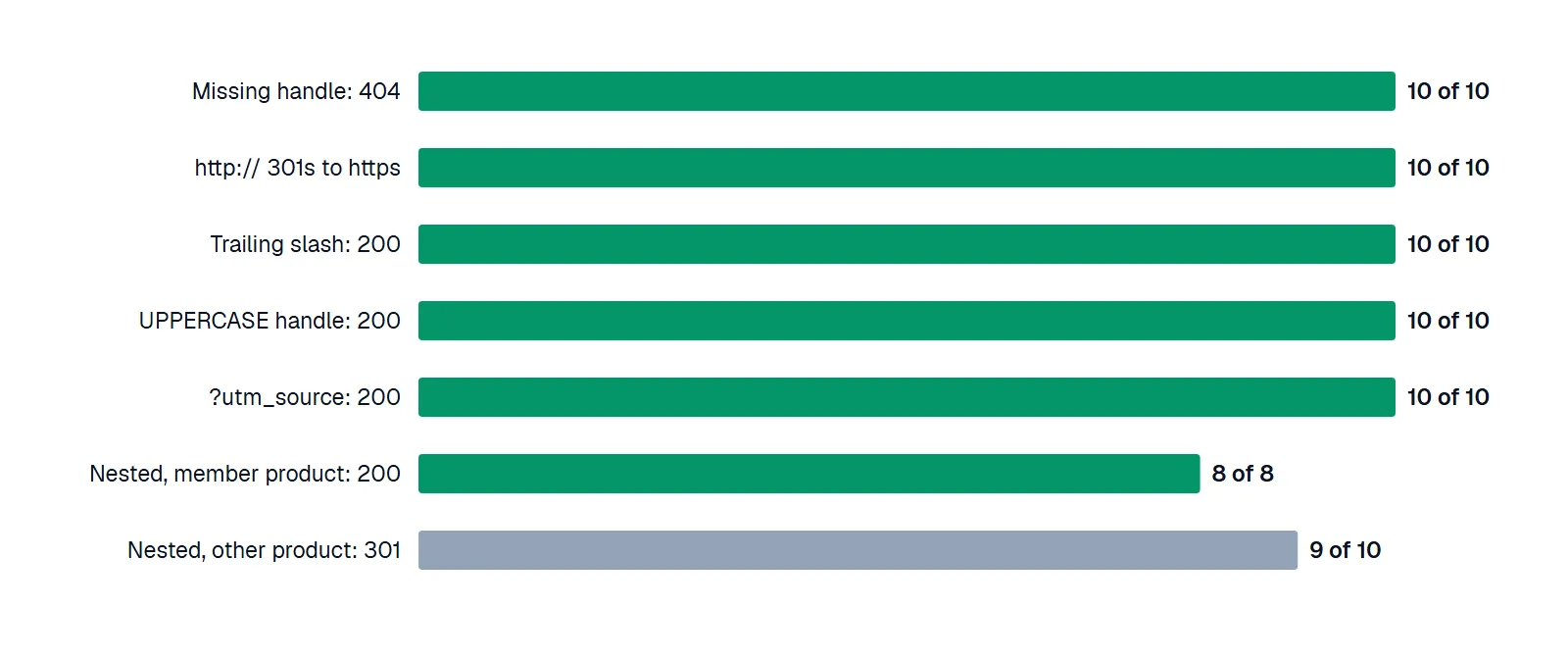
URL variants that Shopify already handles. Source: our own requests to 10 public Shopify storefronts on November 4, 2026.
The last two rows are the useful ones. A collection-nested URL for a product that sits in the collection stays a 200 and points its canonical at /products/<handle>, which is why the Shopify Community answers say to keep canonicals and clean internal links rather than chase a redirect. When the product wasn't in the collection we picked, the store answered with a 301 to /products/<handle> by itself. We didn't confirm that all nine of those products were absent from their collections, but the 8-of-8 versus 9-of-10 contrast points at collection membership as the trigger. Our earlier six-store canonical check found the same 200 and canonical behavior on nested URLs.
Limits. Ten storefronts is a small, convenience sample: we tried 12 candidate domains in the final run, 11 exposed a public product feed, and one of those answered every request with a 302 to a locale subfolder (probably a market redirect for our German exit, which we didn't verify) and is excluded. Large, well-known brands with custom themes are over-represented. The test shows the platform's default behavior on those stores on one day. It says nothing about how Google treats the URLs, and it can't show how an old handle behaves after a rename, because we don't own the stores. A first run was discarded after a host-handling error in our script and rate limiting (HTTP 429); no store from it is counted.
What Shopify can't redirect, and what it handles without one
| URL or situation | Redirect in the admin? | Notes |
|---|---|---|
/products, /collections, /collections/all | No | Fixed paths (Shopify) |
URLs starting /apps, /application, /cart, /carts, /orders, /services, /shop | No | Reserved (Shopify) |
/collections/vendors, /collections/types, /a/, /community/, /tools/ | No | Reserved |
Collection tag-filter URLs such as /collections/<c>/<tag> | No | Listed as not redirectable |
.html URL to the same URL without .html | No | Listed as not redirectable |
| A URL that still renders a live page | Ignored | Only 404 URLs redirect; hidden or draft items return 404 and qualify |
| URLs with query strings | Unreliable | Shopify: "might not behave as expected" |
| Wildcard or regex patterns | Not in the admin | The help page doesn't mention wildcards; apps add them |
Trailing slash, uppercase handle, ?utm_ parameters | Not needed | 200 with a clean canonical on 10 of 10 stores |
| Collection-nested product URL | Not needed | 200 with canonical on 8 of 8; 301 on 9 of 10 other pairs |
| http to https | Automatic | 301 on 10 of 10 stores |
| Redirect for a hidden collection | Removed automatically | When the collection is made visible again |
What the pages ranking today cover. We read two of the guides ranking for this query on November 4, 2026. AdNabu's guide (roughly 3,000 words) covers the 404-only rule, the 100,000 limit, the Plus limit, query strings and market subfolders. LitExtension's (roughly 2,000 words) covers the export and import screens and the 100,000 cap. Neither covers the handle-change checkbox, collection-nested product URLs, trailing slashes or an HTTP check of the result, which is why those sit in this guide.
Why a Shopify redirect doesn't fire
- The old page still exists. The cause Shopify's help page documents. Unpublish or draft the old product, page or collection, or change its handle, then retest. A thread from October 2026 describes losing redirects this way (Shopify Community).
- The path is on the can't-redirect list. Shopify lists these paths as non-redirectable; check the table above.
- The source has a query string. Redirect the clean path instead.
- A
/404to/redirect exists. Shopify's help page says it interferes with the theme editor's 404 preview and should be removed. - A cached 301. Browsers and search engines can keep a 301 after you delete it.
- A chain. Google's crawlers follow up to 10 redirect hops by default, and treat a 301 as a strong signal that the target is canonical and a 302 as a weak one (Google Search Central, checked November 2026).- A JavaScript redirect in the theme. Google says to use JavaScript redirects only if server-side redirects aren't possible (Google Search Central). One commenter in the October 2026 thread above notes that wildcard redirects built in theme JavaScript run only after the 404 page has loaded.
Check a redirect with curl
To see the status code and target without following the redirect:
curl -s -o /dev/null -w "%{http_code} %{redirect_url}\n" https://your-store.com/products/old-handle
# 301 https://your-store.com/products/new-handle
To count hops and see where the chain ends:
curl -sL -o /dev/null -w "%{num_redirects} hops, final %{http_code} %{url_effective}\n" https://your-store.com/products/old-handle
To check every row of a simple redirect CSV (no quoted commas), run it from a terminal:
tail -n +2 redirects.csv | while IFS=, read -r from to; do
  curl -s -o /dev/null -w "%{http_code} $from -> %{redirect_url}\n" "https://your-store.com$from"
done
Anything other than 301 with the target you intended is a row to fix. A 200 means the old page is still live; a 404 means the row never imported.
If the redirect map comes out of a larger audit, our technical SEO and GEO service covers the before-and-after crawl.
FAQ
Are Shopify URL redirects 301 or 302?
The admin form has no redirect-type field, and Shopify's help page refers to them as 301 redirects that can stay cached after you remove them. Google treats a 301 as a strong signal that the target is canonical.
Does Shopify create a redirect when I change a handle?
The admin handle editor offers a "Create a URL redirect" checkbox, per Shopify Community threads. Confirm the pair appears in Content > Menus > URL redirects. Through the API, productUpdate takes a redirectNewHandle flag.
How many redirects can a Shopify store have?
100,000 on standard plans and 20,000,000 on Plus, per Shopify's help page.
Can I redirect a whole collection or use a wildcard?
Not with the admin tool: it matches exact paths, and the help page doesn't mention wildcards. Map each old URL, or use a redirect app for patterns. Collection tag-filter URLs can't be redirected at all.
How long should I keep a redirect?
Google says generally at least one year for a site move, and indefinitely if you can.