Google Merchant Center Misrepresentation: Causes and Fix
A misrepresentation suspension is Google's verdict on your store, not on one product. Start with the exact wording of the notice, because the fix, the warning window and the review options all depend on which part of the policy it cites.

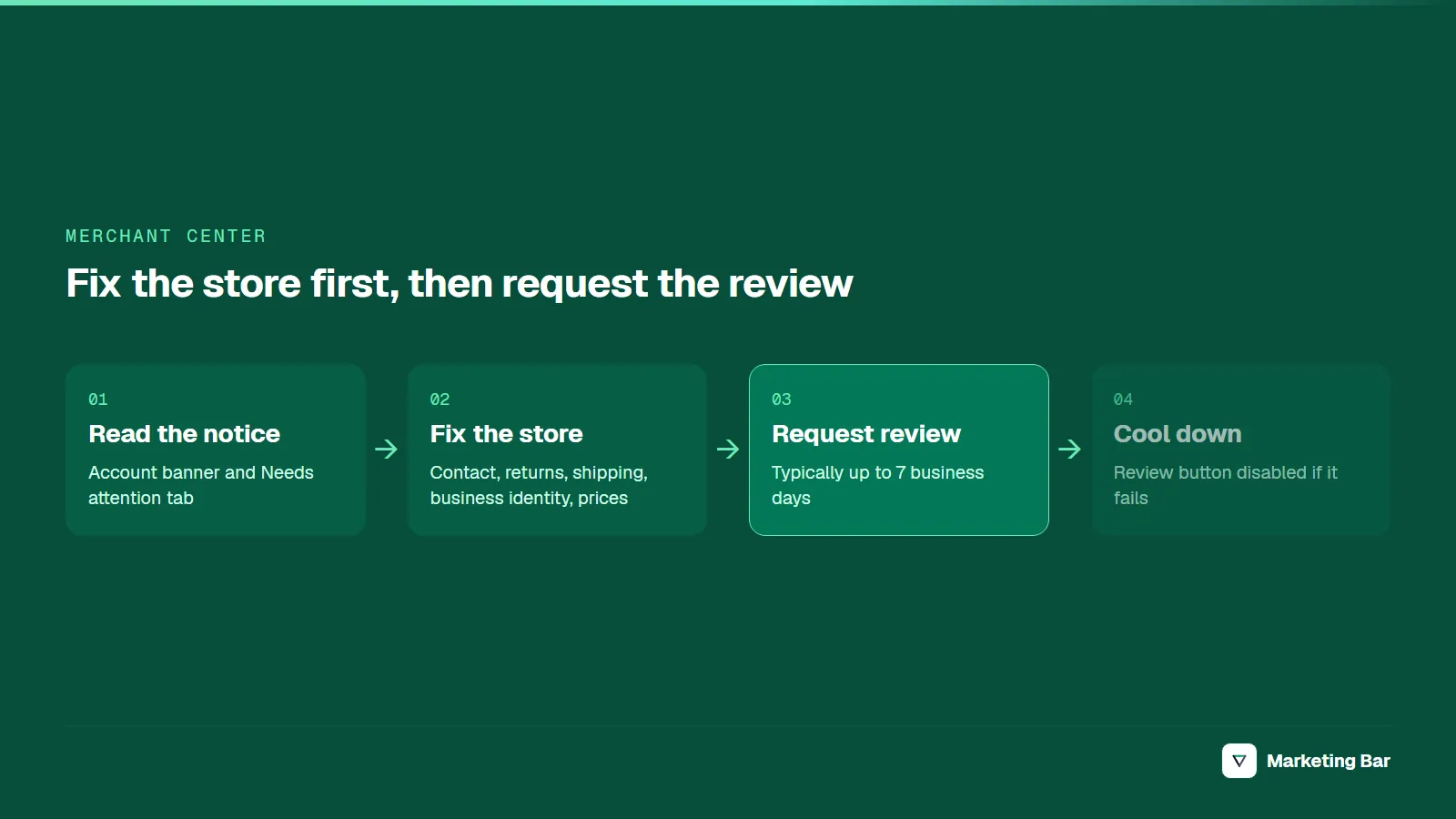
A Google Merchant Center misrepresentation suspension means Google decided that your store or your offers are not "accurate, realistic, and truthful", and your products stop serving until a review approves the account. The first thing to check is not the product feed. Open the notice, find which part of the policy it cites, and then open the Needs attention tab: Google says you may have to submit a government-issued ID or business documents before the review button becomes available (Request a review, checked Nov 2026).
This guide separates three kinds of statements and labels each one: what Google's help pages say, what the pages that rank for this query assert, and what is only forum folklore. It also reports a small check we ran ourselves on whether the pages Google asks for exist on 24 public online stores. Product-level disapprovals (price, GTIN, image) are a different queue; those are covered in our Google Shopping feed guide.
Key takeaways
- Read the notice and the Needs attention tab first. Verification requests can lock the review button.
- Some misrepresentation categories are suspended on detection with no warning. Others carry a warning of at least 7 days. Which one you are in decides how much time you have.
- Google states one courtesy review during the warning period, one chance to disagree, and a cool down that can grow after failed reviews. It publishes no total number of requests.
- Fix the store and the data before you request anything. A review covers all issues for the country, and a failed one costs you waiting time.
- On 24 public stores we checked, 20 had a reachable contact page and 20 a returns page, but only 6 showed a street address or PO box.
What a misrepresentation suspension covers
Google's misrepresentation policy (checked Nov 2026) prohibits offers that prompt a purchase "without first providing all relevant information and getting the customer's explicit consent", and offers that represent you or your products "in a way that isn't accurate, realistic, and truthful". The policy page groups the violations into six headings: unacceptable business practices, coordinated deceptive practices, dishonest pricing and transaction conditions, unavailable offers, manipulated media, and unreliable claims.
The suspension applies to the Merchant Center account. Most of the behaviors on Google's list concern the site, the business details and the checkout terms rather than individual feed rows, so a store with a clean feed can still be suspended. Google also says its review "will apply to all issues for the country you sell products in", so a partial fix does not clear a country (Request a review).
Symptoms, causes and fixes in Google's own wording
Every row below comes from a sentence on Google's policy pages. The "fix" column is the direct inverse of the prohibited behavior, plus the Google page that backs it.
| What you see | What Google's text prohibits | What to change |
|---|---|---|
| Business name, address, phone or email differ between the store and Merchant Center | "Present a false identity, business name, or contact information" | Make legal name, address, phone and email match on the store, in Merchant Center business info and on the official profiles. Google's own audit list says they "must match across your online store" (Fix warnings and suspensions) |
| No visible address, phone or email on the store | "Hiding, omitting, or misrepresenting material details about your actual business location" | Put address, phone and email where a shopper can see them. Google's review page says to "ensure accurate business details such as address, phone, and email are visible on your online store" |
| The business is described as a retailer it is not, or the location is vague | "Pretending to be a discount online retail store to entice people into buying products" and misrepresenting the shipping location | Describe who actually sells and ships, and from where |
| Price at checkout is higher than the price advertised | "Not disclosing the total price, including all taxes, fees, and surcharges" | Show taxes, fees and surcharges before the final step, and keep the feed price equal to the page price |
| Subscription or installment terms are in fine print | "Omitting recurring costs and the billing interval" | State the amount and interval next to the price |
| Delivery promise in large type, handling time in small type | "Claiming a delivery time in conspicuous text while hiding a longer order processing or handling delays" | Show handling time and transit time together |
| Return page missing, or refunds refused despite a policy | "Denying return and refund for a product despite having a clear refund or return policy" | Publish the policy and honor it. Google's trust page asks for "detailed information about your policies including shipping, returns and privacy policies" (Building trust) |
| International return window runs from the purchase date | "Setting international return windows to begin on the purchase date rather than the actual delivery date" | Start the window at delivery |
| Items listed as in stock that you cannot ship | "Listing items as available when you lack the capability to fulfill the orders" | Sync availability and remove what you cannot fulfill. Google asks that prices and availability "exactly match your online store" |
| Health or weight-loss claims on product pages | "'Miracle cures' for medical ailments, such as extreme weight loss products" | Remove the claims from the pages and the feed |
| No About page, inconsistent brand name | Not a quoted violation. The trust page asks for "the official business name that you use across the web" and an "about us" page | Add the page and use one name everywhere |
Warning or immediate suspension
The policy page splits the six categories by how Google enforces them.
| Category | Warning before suspension? |
|---|---|
| Unacceptable business practices | No. Accounts "will be suspended upon detection and without prior warning" in egregious cases |
| Coordinated deceptive practices | No. Treated as egregious |
| Dishonest pricing and transaction conditions | No. The policy states accounts "will be suspended upon detection and without prior warning" |
| Unavailable offers | Yes. "A warning will be issued at least 7 days prior to any suspension" |
| Manipulated media | Yes. Same 7-day minimum |
| Unreliable claims | Yes. Same 7-day minimum |
For the no-warning categories the page adds that the merchant "will not be allowed to list content with us again", and that accounts are "only reinstated in compelling circumstances". Separately, the account disapproval section says Google sends a warning email and gives "7 or 28 calendar days" to fix, "however, we may not issue a warning for egregious policy violations."
If your notice cites a category from the first three rows, the realistic goal is an accurate appeal with evidence, not a quick resubmission. If it cites one of the last three, the warning window is the cheapest time to fix: Google lets you ask for one courtesy review during it.
Google's advice is to "thoroughly examine your online store and Merchant Center account" before requesting a review. Each unsuccessful review can lengthen the cool down.
The review sequence, step by step
Read the notice and match it to a policy heading
Account-level issues appear in a banner at the top of Merchant Center and arrive by email. Note the exact sentence and the date. Check whether it is an account issue or a product issue: product issues sit under the Needs attention tab of the Products page, with their own "Request website check" and "I disagree" actions.
Finish the verification tasks
Open Needs attention. Google lists requests for a government-issued ID, business documents and similar items there, and the review button may stay unavailable until they are done. Your data source also must not be empty.
Fix the store and the data
Work through the table above. Check the store as a stranger would: contact details, returns, shipping, total price at checkout, business name. Make feed prices and availability match the pages.
Choose the right request
During a warning period you can request one courtesy review. "I disagree with the issue" is for cases where you believe the issue is a mistake, and Google says you may have only one chance to disagree. Do not use it on a store you have just changed.
Wait, then read the outcome
Google's pages give three different timings, listed below. While a review runs, ads may not show. For product-level reviews Google says approved products can show again within 24 hours of approval.
Review limits as Google states them
| Limit | Google's wording | Where |
|---|---|---|
| Courtesy review | "one courtesy review of your account at any time during the warning period of 7 or 28 days" | Request a review |
| Disagree | "You may only have one chance to disagree with the issue" | Same |
| Cool down start | After you have "exhausted the option to disagree" | Same |
| During cool down | The review button is greyed out. "Google support can't bypass or shorten the cool down period" | Same |
| Escalation | The cool down "may increase with each unsuccessful review". After a failed second attempt "a one-week cool down period may begin" | Same |
| Review time | Up to 7 business days for a disagree or a cool-down review, up to 2 weeks for notification-based reviews | Same |
| Review time (account policy page) | "Typically 7 business days, but may take longer for complex reviews" | Misrepresentation |
| Review time (Shopify guide) | "Typically take up to 3-7 business days" | Fix warnings and suspensions |
None of these pages states a total number of review requests. They describe a mechanism, a cool down that lengthens, and they differ on how long one review takes. Plan on days to two weeks and do not rely on any single figure.
If you sell on Shopify, Google's guide places the button under Sales channels, then Google & YouTube, then Settings, then Request review under the connected Google account.
Merchant Center policy text versus ranking guides
The first table is what Google publishes. This one separates it from the rest. We read the Google pages above on 2026-11-04 and one ranking guide in full (seo.ai, "This is How You Fix Your Google Merchant Center…"). We did not read the Reddit thread that ranks for this query, and the support-forum threads returned only page navigation to our fetch, so nothing below is drawn from them.
| Statement | Source | Status |
|---|---|---|
| Egregious categories are suspended with no warning, others get at least 7 days | Google misrepresentation policy | Google states it |
| One courtesy review, one disagree, escalating cool down | Google review page | Google states it |
| Suspensions resolve "within days; others take weeks" | seo.ai guide | The guide's own summary. Google's pages say typically 3 to 7 business days, longer for complex reviews, and give no resolution time for the account as a whole |
| Pre-orders, 404 or 503 landing pages and country-restricted content cause misrepresentation | seo.ai guide | The guide's inference. None appears in Google's six categories. The page links no Google policy page for these causes |
| A punctuation mismatch such as "Company, Inc." versus "Company Inc." triggers a flag | seo.ai guide | Not in Google's text. Google asks the legal name to match across the store |
Treat the guide-only rows as hypotheses to test on your own store, not as policy.
Which of Google's required pages 24 public stores have
Google's trust page asks for an About page, a clear way to reach you, and shipping, returns and privacy policies; its review page asks for address, phone and email on the store. We checked how many public stores have them.
How the sample was built. On 2026-11-04 we collected US Google results for 15 product-intent queries (for example "buy handmade leather wallet online") through DataForSEO. We dropped marketplaces, large national retailers and media sites, which left 142 store domains. We took the first 30 after sorting by a hash of the domain name, so no one chose them by hand. We request only public pages with plain GET requests, one per host about every 1.2 seconds, with an identifying user agent, and we honor robots.txt. No store is named here.
What we could measure. 24 of the 30 stores. Three timed out, one disallows its homepage in robots.txt, and two returned HTTP 403 to a script. For each store we looked for a link in the homepage HTML whose URL or text matched contact, returns, shipping, about, privacy or terms. If there was none, we tried the conventional paths such as /policies/refund-policy and /pages/contact.
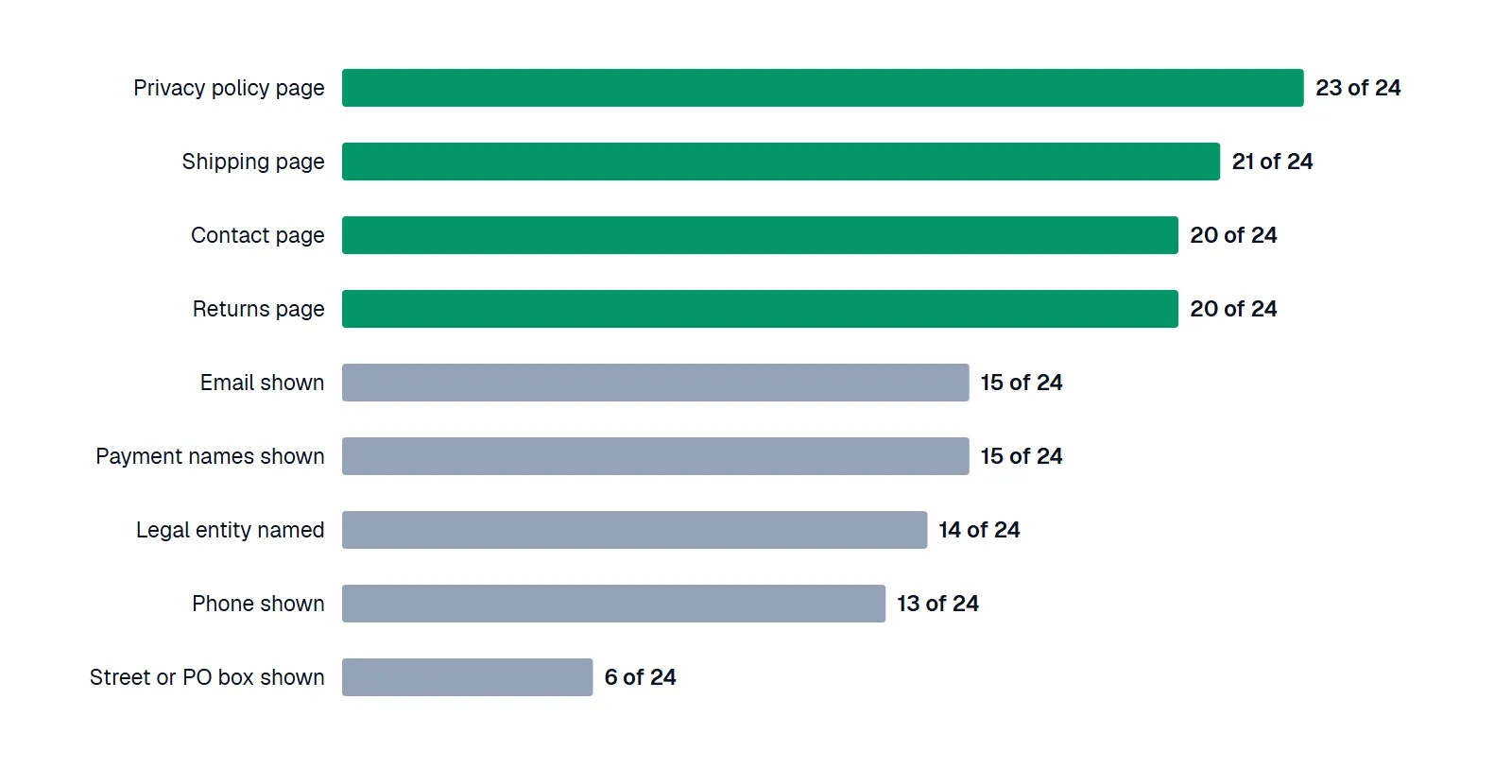
Policy pages are common; a visible street address is not. Source: Marketing Bar check of 24 public stores, 2026-11-04.
| Item | Stores (of 24) | Detail |
|---|---|---|
| Privacy policy page reachable | 23 | |
| Terms page reachable | 22 | |
| Shipping page reachable | 21 | 15 of the 21 stated a delivery time in days |
| About page reachable | 21 | One more was linked but returned 404 |
| Contact page reachable | 20 | One more returned 403 to us |
| Returns page reachable | 20 | 16 of the 20 stated a return window in days |
| All six page types reachable | 15 | |
| Email, phone or address visible on the homepage or contact page | 22 | Email 15, phone 13, street address or PO box 6 |
| Card or payment names shown on the homepage | 15 | |
| Company name with a legal suffix (LLC, Inc., Ltd) on the homepage, About, terms or privacy page | 14 |
Four stores had no returns page that we could find by either method. A store can state returns inside its FAQ or terms, and we would have counted that as missing. Limits of the check: it shows that pages exist and are reachable, not that they are accurate or consistent with Merchant Center; the address and phone detection is pattern matching and misses unusual formats; sites that build menus with scripts can hide links from a plain request; the sample comes from stores that rank for product queries and says nothing about stores Google has suspended; and we did not test checkout security or total-price disclosure, which need a purchase flow. The one result that stands out against Google's wording is the address: 6 of 24 stores showed one in a form we could detect, while Google's review page lists address, phone and email together.
FAQ
Google gives several figures. The misrepresentation policy says account reviews typically take 7 business days and may take longer for complex ones. The review page says up to 7 business days for a disagree and up to 2 weeks for notification-based reviews. Google's Shopify guide says 3 to 7 business days.
Google states one courtesy review during a 7 or 28 day warning period and one chance to disagree. After that a cool down begins, and it may get longer after each unsuccessful review. No page we read gives a total number of requests.
It depends on the category. For unavailable offers, manipulated media and unreliable claims, Google says it warns at least 7 days before suspension. For unacceptable business practices, coordinated deceptive practices and dishonest pricing, it says accounts are suspended on detection without prior warning.
Google gives two reasons: a cool down after you used up the option to disagree, or open tasks such as ID or business-document verification under Needs attention.
No. Product disapprovals appear under Needs attention on the Products page and are fixed and rechecked item by item. The misrepresentation suspension is an account-level issue shown in a banner, and its review covers all issues for the country.
If the account is suspended and the store is the cause, Marketing Bar covers Merchant Center and Shopping setup within its paid advertising service.